
1-10 UsersNew in 2.0
Ultimate Risk Matrix
License tier: 1–10 users — small teams and pilot projects. Ultimate Risk Matrix helps you build clear Power BI risk matrix reports that show likelihood, impact, and priority....
659.00 CHF
Buy Now
License tier: 1–10 users — small teams and pilot projects. Ultimate Risk Matrix helps you build clear Power BI risk matrix reports that show likelihood, impact, and priority....
License tier: 10–50 users — growing departments. Ultimate Risk Matrix helps you build clear Power BI risk matrix reports that show likelihood, impact, and priority. Price for one...
License tier: 100–150 users — multi-team business units. Ultimate Risk Matrix helps you build clear Power BI risk matrix reports that show likelihood, impact, and priority. Price for...
License tier: 150–200 users — larger operations and analytics teams. Ultimate Risk Matrix helps you build clear Power BI risk matrix reports that show likelihood, impact, and priority....
License tier: 200–300 users — enterprise reporting groups. Ultimate Risk Matrix helps you build clear Power BI risk matrix reports that show likelihood, impact, and priority. Price for...
License tier: 300–500 users — broad enterprise deployments. Ultimate Risk Matrix helps you build clear Power BI risk matrix reports that show likelihood, impact, and priority. Price for...
License tier: 50–100 users — mid-sized reporting teams. Ultimate Risk Matrix helps you build clear Power BI risk matrix reports that show likelihood, impact, and priority. Price for...
Sales offer: Unlimited User license — broad enterprise deployments. Ultimate Risk Matrix helps you build clear Power BI risk matrix reports that show likelihood, impact, and priority. Price...
New in 2.0.0.1
Open an occupied cell in the Classic heatmap to review its risks in a docked Detail Cell/Table. Search for an owner, sort by review date, follow a risk-register link and compare Start / Current / Treated values without adding another visual to the report.
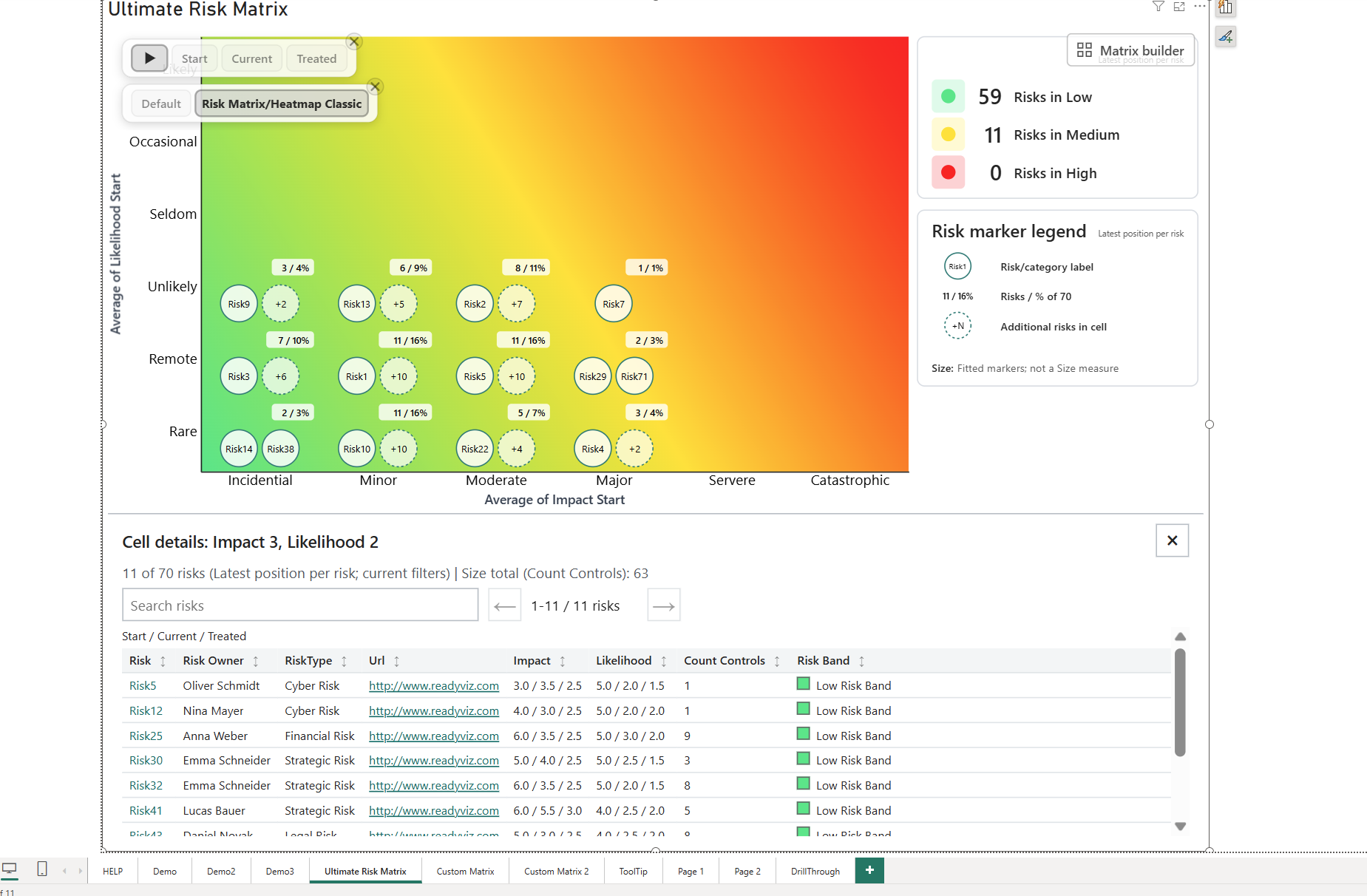
See the setup steps and all table controls
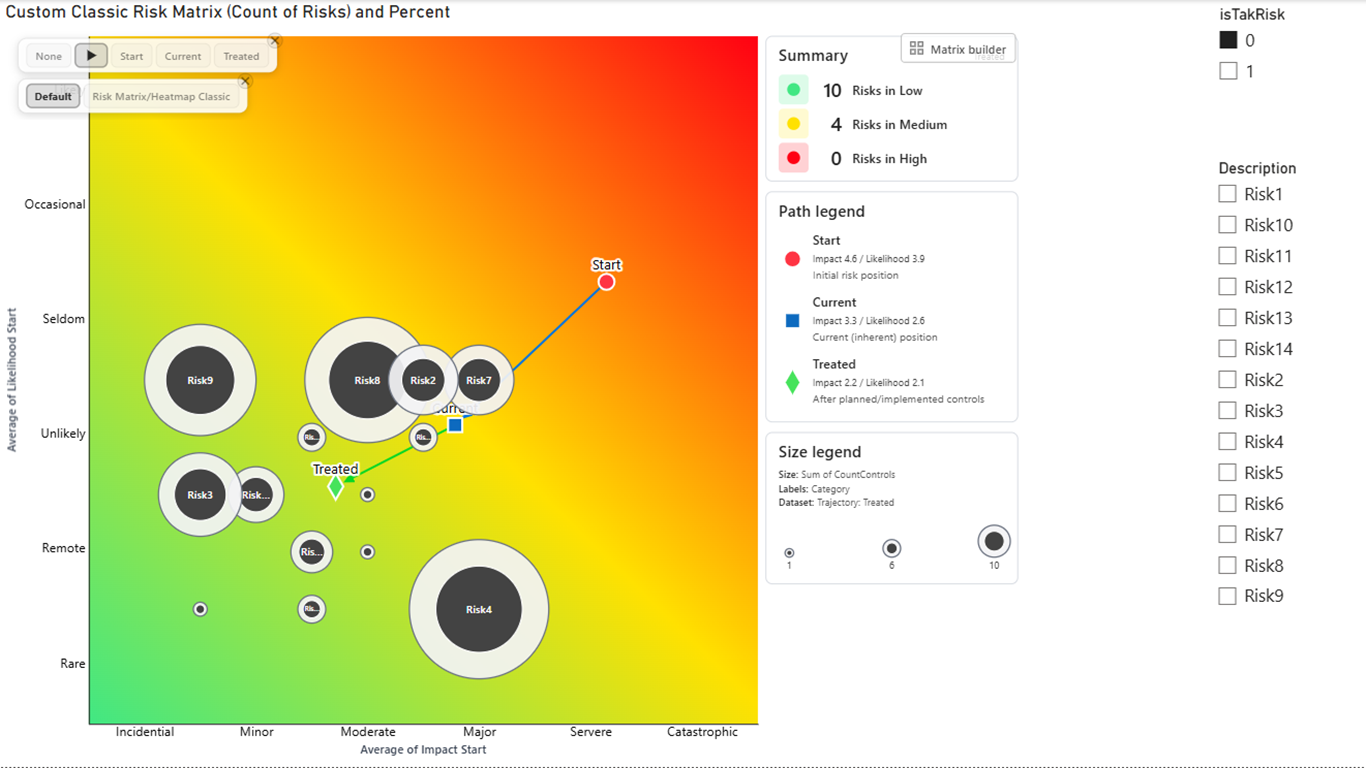
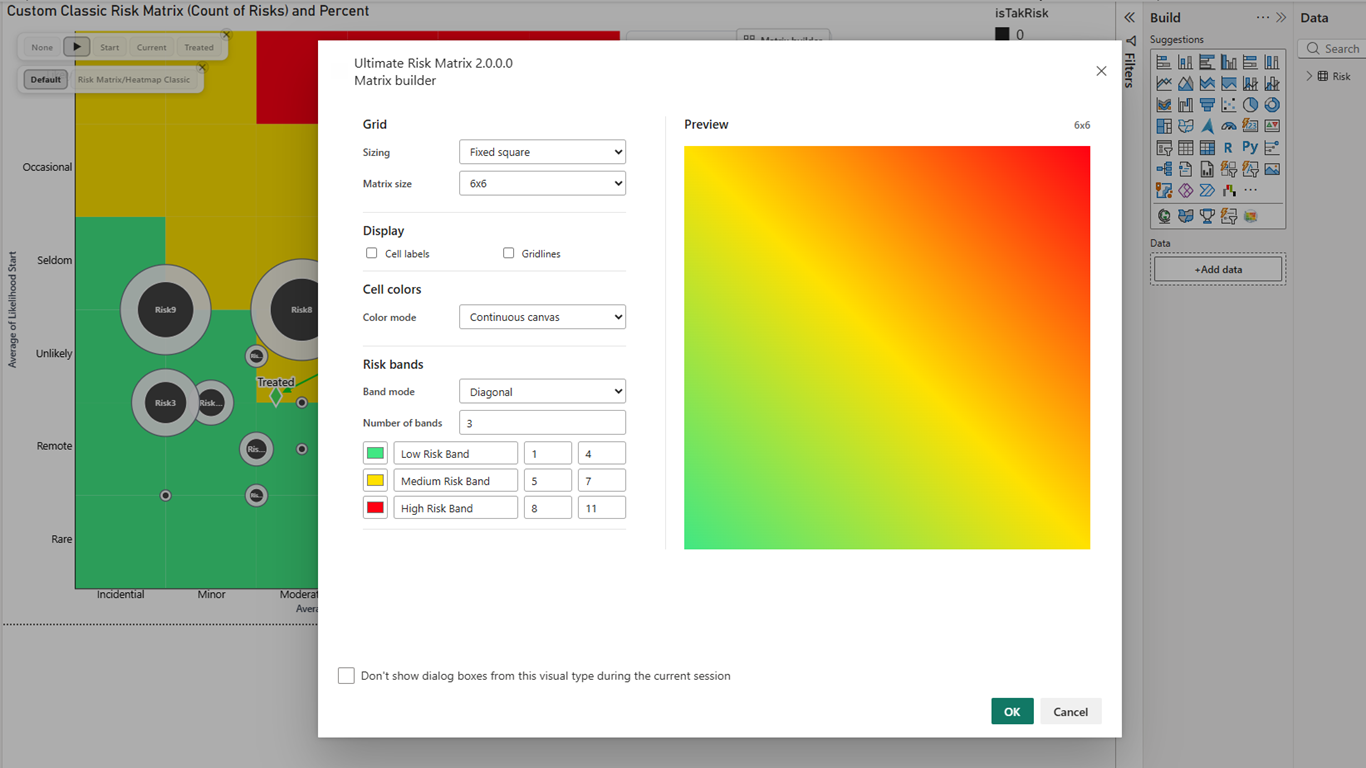
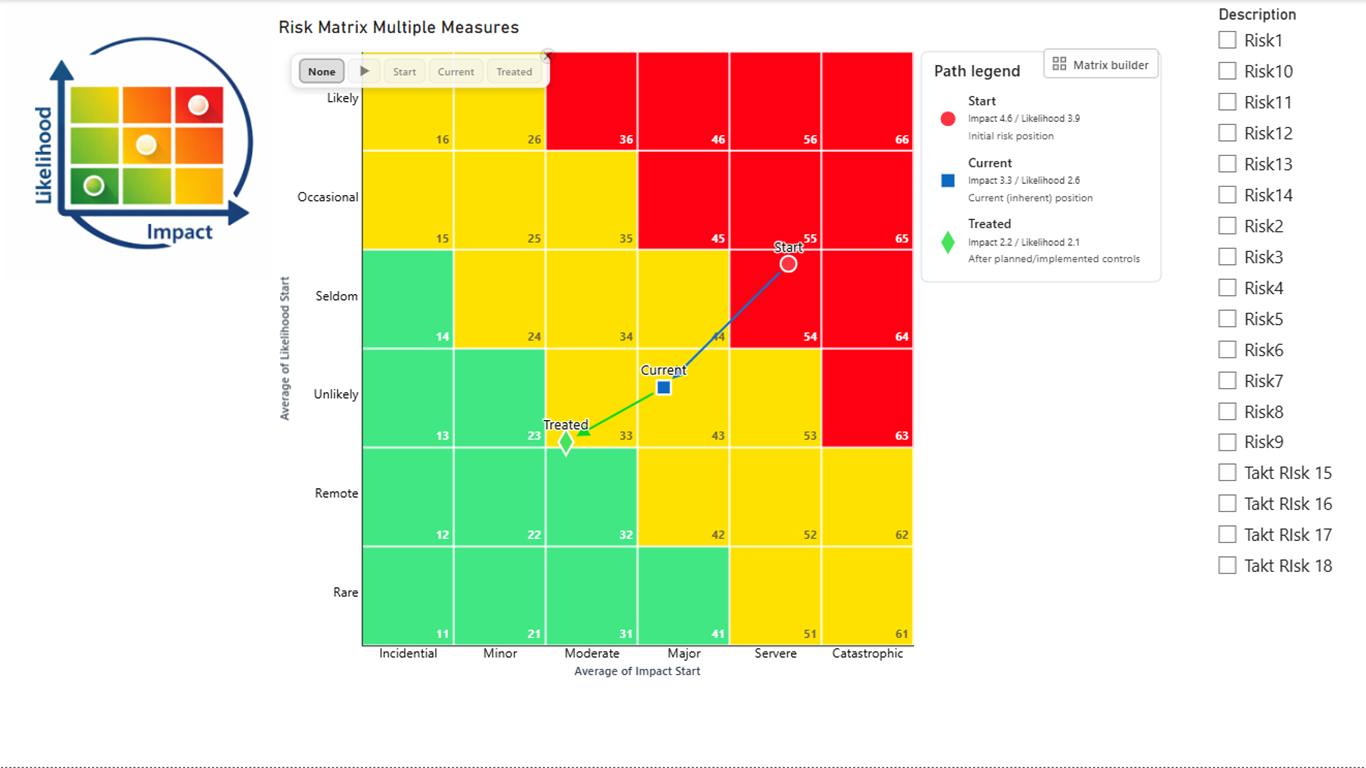
Ultimate Risk Matrix 2.0 gives report authors more control over the matrix, the story behind each risk, and the way movement is presented. Build a rectangular 6×5 matrix or another custom layout, define up to 10 named bands, assign shapes by risk band or dataset, and explain risk movement with modern tooltips, legends, and animated trajectories.
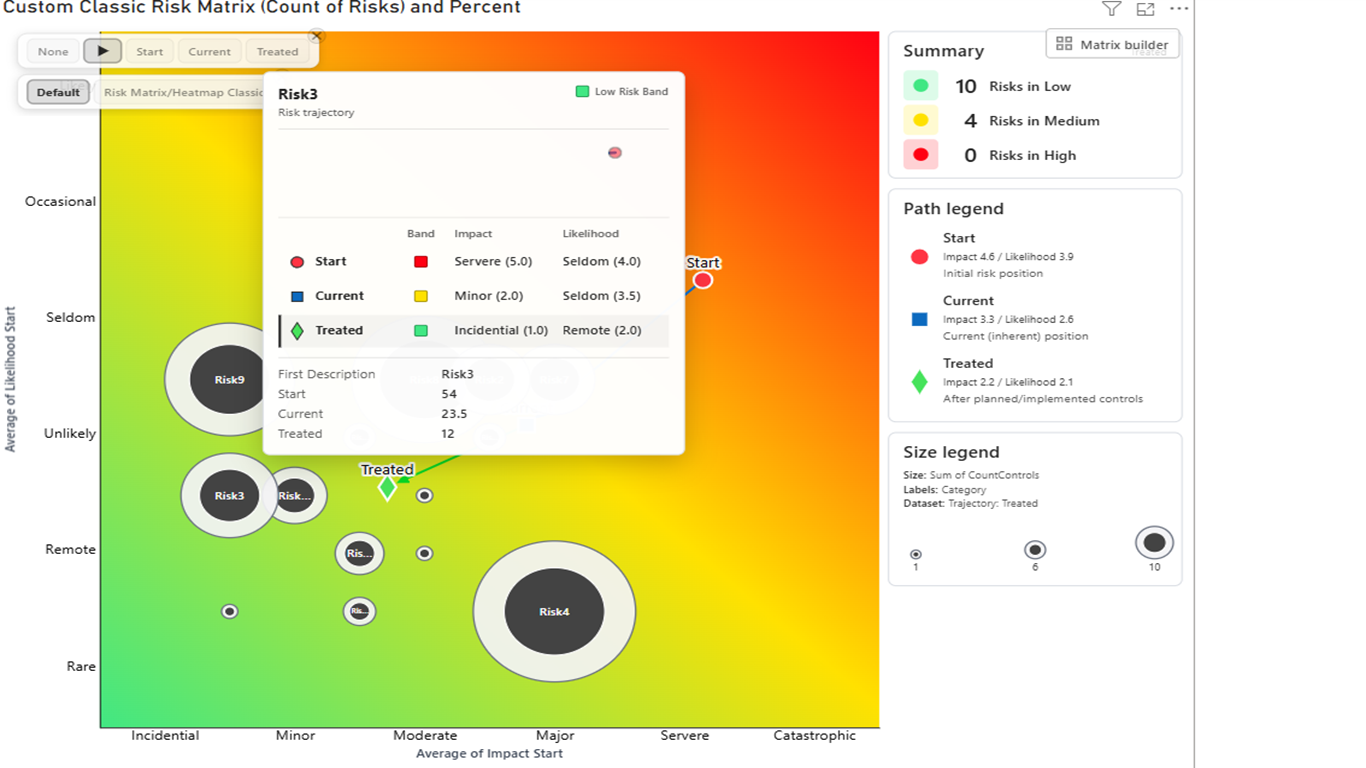
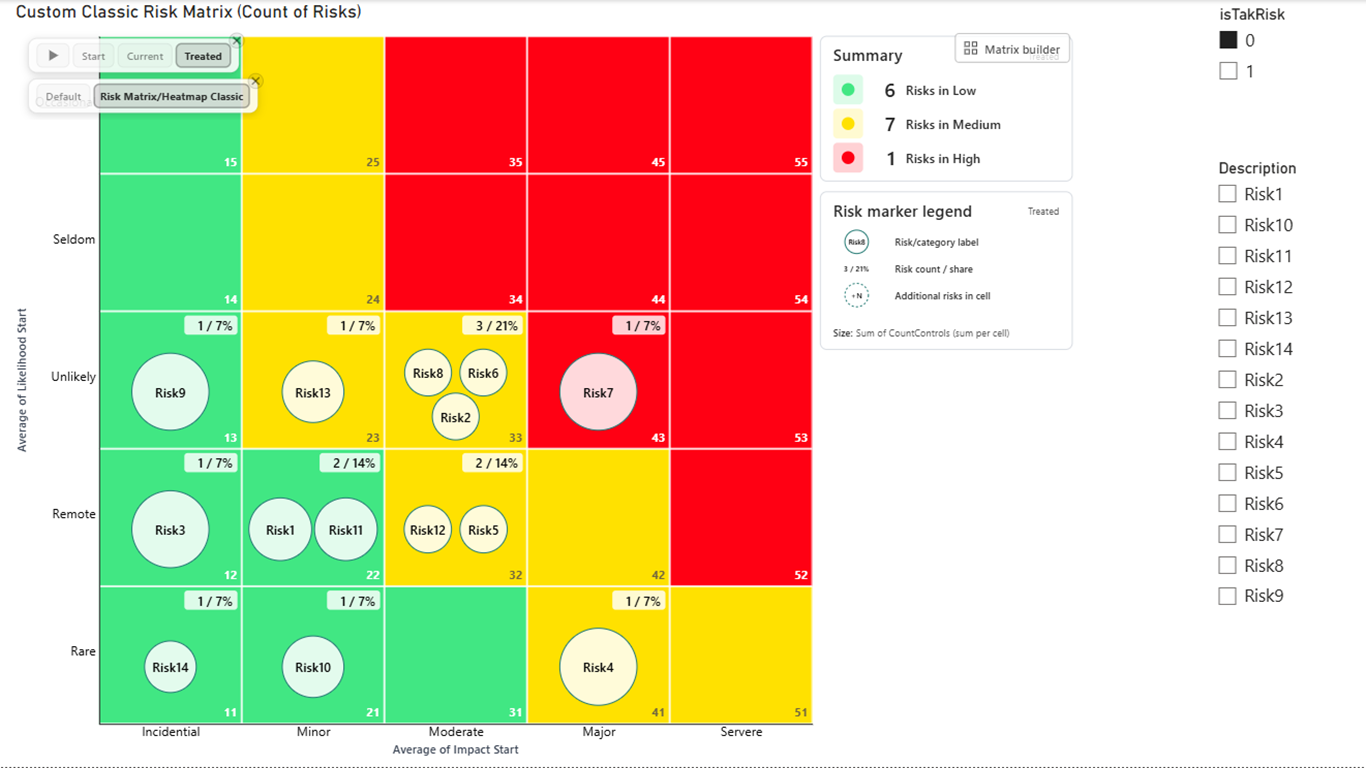
Read the Ultimate Risk Matrix 2.0 documentation or see the feature announcement and walkthrough.
The Ultimate Risk Matrix helps risk, audit, compliance, project, and management teams show where each risk sits, how severe it is, and which items deserve attention first. This Power BI risk matrix visual is built for recurring risk reviews, executive dashboards, portfolio reporting, operational risk meetings, and board packs where decision-makers need a clean view of exposure rather than another spreadsheet.
Start with a risk register that contains risk name, likelihood, impact, owner, category, mitigation status, and review date. Add the Ultimate Risk Matrix visual to a Power BI report page, map likelihood and impact to the matrix axes, then use colors, bands, labels, and slicers to show which risks need attention. The result is a risk matrix in Power BI that can be filtered by project, department, owner, date, or risk type.
Use the visual to turn a normal risk register into a structured Power BI report page. Report builders can map likelihood and impact fields, group risks by category, style severity bands, and use Power BI slicers to focus on a business unit, project, owner, or reporting period. The result is a matrix that works for both operational review and executive summary reporting.
If your team calls this view a Risk Heat map, the Ultimate Risk Matrix gives you the same decision-focused layout inside Power BI while adding filtering, custom labels, risk bands, and report-ready styling.
Prepare a risk register with clear risk names, likelihood values, impact values, owners, categories, mitigation status, and review dates. Decide how risk bands should be named and which labels should appear on each axis. This makes the first Power BI implementation easier to maintain and easier to explain during review meetings.
A spreadsheet-style template can document risk scores, but a custom visual gives Power BI report builders more control. Teams can label axes with their own terminology, separate risks into bands, compare categories, and keep the layout consistent across reports. That makes the visual easier to explain to non-technical stakeholders and easier to reuse across reporting cycles.
ReadyViz offers license tiers for different team sizes, from small pilots to broad enterprise deployments. Choose the tier that matches the number of users who need access to the visual in Power BI. If the report will be distributed across multiple departments, choose a larger tier so the same matrix standard can be used consistently.
Choose the license tier that matches the number of users who need access to the Power BI visual.
The visual is designed for Microsoft Power BI custom visual workflows and professional reporting environments. Use the documentation to plan field mapping, formatting, data preparation, and visual interpretation before rolling it out to a wider reporting audience.
Read the Ultimate Risk Matrix 2.0 documentation or view the visual on Microsoft Marketplace.
A Power BI risk matrix plots risks by likelihood and impact so teams can compare exposure, severity, and priority directly inside a Power BI report.
Yes. With the Ultimate Risk Matrix custom visual, Power BI can display probability, impact, risk bands, labels, and filtering in an interactive probability-impact matrix.
It is a custom visual, not a static template. That means report builders can connect it to their Power BI data model, slicers, filters, formatting, and recurring reporting process.
It is designed for risk managers, audit teams, compliance teams, project teams, PMOs, and business leaders who need clearer Power BI risk reporting.
Select the tier based on the number of users who need access to the visual. Smaller tiers fit pilot teams; higher tiers fit larger reporting groups and enterprise deployments.
Yes. The visual supports custom labels, band styling, marker configuration, and layout choices so teams can align the report with internal risk terminology and governance standards.
Yes. Matrix Builder can use independent X-axis and Y-axis values, so report authors can create rectangular layouts such as 6×5 as well as standard square matrices.
Yes. Dynamic trajectory animation can show movement between risk stages, with dataset selection, movement lines, configurable duration, and finite or continuous looping.
Yes. The modern tooltip can include risk-band, trajectory, and additional-field details. The legend can show path, statistics, and bubble information with editable labels and styling.